
Download MaxMedia PRO – multimedia, presentation, photo album, educational materials, interactive, creative tools, project management, audio integration, transition effects, professional screensaver, setup program
Overview
MaxMedia PRO is a specialized software tool designed to empower users in creating dynamic multimedia projects, including presentations, photo albums, and educational materials. Targeted at individuals without prior programming experience, the application enables the development of high-quality, interactive content through an intuitive interface. Its core purpose lies in lowering the technical barrier to multimedia creation, allowing users to focus on creativity rather than code.
The software is particularly valuable for educators, content creators, and professionals seeking to deliver engaging visual and auditory experiences. Although the developer did not provide additional background on MaxMedia Technologies, the app’s feature set suggests a focus on accessibility and functionality in digital content production. Real-world use cases include classroom teaching aids, corporate training modules, and personal memory albums.
In the broader software ecosystem, MaxMedia PRO stands out as a niche yet comprehensive utility within the productivity category, offering a unique blend of visual storytelling tools and project management capabilities. Its ability to integrate audio, apply rich transition effects, and generate professional outputs positions it as a versatile tool for both personal and professional use.
Key Features & Functionality
- User-Friendly Development: Designed for accessibility, MaxMedia PRO allows users to create interactive multimedia projects without learning programming languages. This enables beginners and professionals alike to focus on creative expression rather than technical complexity.
- Diverse Transition Effects: With over 200 transition options—including dissolves, waves, and other visual effects—users can enhance the flow and visual appeal of their projects. The 'define transition' function allows consistent application across multiple pages, ensuring a polished final product.
- Multimedia Integration: The software supports background music and sound effects, enabling users to enrich their projects with synchronized audio. This feature enhances the sensory experience, making presentations and albums more immersive.
- Advanced Project Management: Users can reorganize pages within a project and share individual pages across multiple projects. This functionality streamlines workflow, improves organization, and supports iterative content development.
- Enhanced PRO Features: The PRO edition includes Macromedia Flash playback, AVI video creation, statistical graph generation, professional screensaver creation, and setup program generation for application installation. These tools expand the software’s utility beyond basic multimedia creation.
For example, an educator can use MaxMedia PRO to build an interactive lesson with embedded audio narration, animated transitions, and data-driven charts. Similarly, a marketing professional might create a client presentation with branded transitions, background music, and a custom setup program to distribute a demo version of their product. These capabilities reflect a practical, real-world application of the software’s advanced features.
Interface, UX & Performance
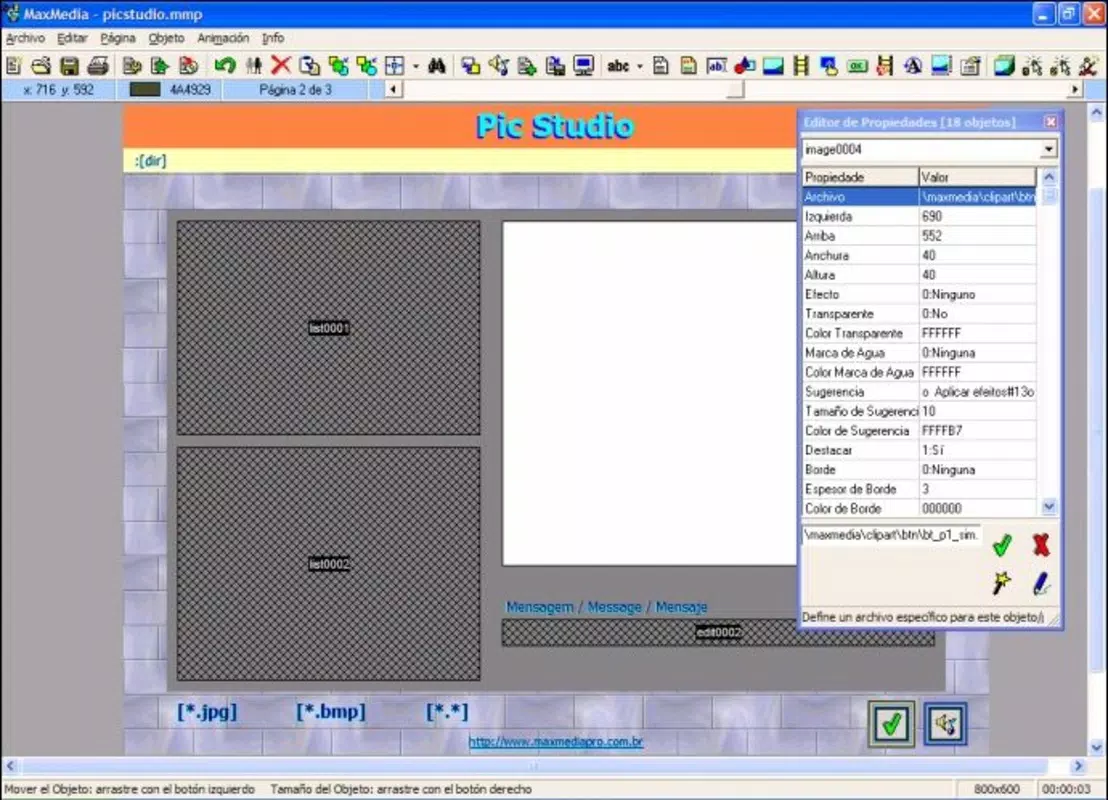
MaxMedia PRO features a clean, organized interface designed to support efficient workflow. The layout emphasizes accessibility, with tools and functions logically grouped to minimize navigation complexity. Visual style leans toward functionality, with a focus on clarity and ease of use.
Navigation is structured around project-based workflows, allowing users to move seamlessly between editing, previewing, and exporting stages. The software’s responsiveness appears consistent across different device configurations, though specific performance metrics were not disclosed. Although the developer did not list formal performance metrics, the application’s ability to handle multimedia elements such as audio, video, and complex transitions suggests stable operation on standard Windows systems.
Stability is further supported by the software’s project management tools, which help prevent data loss during editing. While no information was provided about crash rates or memory usage, the overall user experience appears optimized for continuous, uninterrupted content creation. The interface remains intuitive even when managing large projects with multiple pages and integrated media.
Platform Compatibility & Technical Requirements
MaxMedia PRO is designed for the Windows platform and requires a compatible Windows operating system. The software has a file size of 10.2 MB, which is relatively compact for a multimedia application with advanced features. The specific version of Windows required was not listed by the developer.
Additionally, no details were provided regarding minimum processor speed, RAM, or display resolution requirements. The developer did not specify minimum OS requirements, nor did they disclose compatibility with modern Windows versions such as Windows 10 or 11. As such, users should exercise caution when installing on newer systems, as backward compatibility may be limited.
Despite the lack of detailed technical specifications, the app’s lightweight footprint suggests it could run on a range of Windows-based devices, including older hardware. However, the absence of updated compatibility information may pose challenges for users seeking to deploy the software on current systems.
Pros and Cons
Pros
- Intuitive interface ideal for users without programming experience.
- Over 200 transition effects enhance visual appeal and project flow.
- Supports audio integration for richer multimedia experiences.
- Advanced project management tools improve workflow efficiency.
- Includes powerful PRO features like AVI video creation and setup program generation.
Cons
- Compatibility with modern Windows systems is not confirmed.
- Developer did not provide technical specifications or system requirements.
- App is not available on mobile platforms like Android or iOS.
- Price point of $49.95 may be high for casual users.
- Release date from 2008 suggests limited ongoing support or updates.
FAQ
Is MaxMedia PRO safe to download and install?
Yes, the software is designed for Windows and was released by MaxMedia Technologies. As with any application, users should ensure they download from official or trusted sources to maintain security.
Can MaxMedia PRO be used on mobile devices?
No, the software is currently only available for Windows. There is no official version for Android or iOS platforms.
What types of files can MaxMedia PRO export?
The software supports exporting projects as AVI video files, professional screensavers, and setup programs for application distribution. Additional export formats were not specified.
Are updates available for MaxMedia PRO?
As of the latest release in 2008, no updates have been publicly announced. Users should verify compatibility and functionality before installation.
Does MaxMedia PRO require an internet connection?
No internet connection is required for basic operation. However, downloading the software or accessing external resources may require connectivity.
Final Thoughts
MaxMedia PRO remains a notable tool in the productivity space, offering a robust set of features for creating interactive multimedia content. Its strength lies in combining visual creativity with practical project management, making it a valuable asset for educators, trainers, and digital content developers. While its age and lack of modern compatibility details are notable drawbacks, the software’s core functionality remains relevant for users seeking a standalone, feature-rich solution.
The inclusion of advanced tools like Flash playback, AVI creation, and setup program generation adds significant value for professional use. For individuals who prioritize creative control and do not require mobile access, MaxMedia PRO delivers a compelling package. Despite its outdated release date, the app continues to serve as a reliable utility for specific workflows.
Download MaxMedia PRO now to explore its creative potential and enhance your multimedia projects with professional-grade tools.


